Humidifier Rattling Noise? Loose Parts Or Internal Problem?
Quick Answer (Most Likely Cause)
The most common cause of a humidifier rattling noise is a loose cover, tank, or base panel transferring vibration from the fan or ultrasonic plate into the housing. First step: unplug the unit, remove and reseat the water tank and any snap-on covers, then run it on a level surface while lightly pressing on the housing to see if the rattle stops. If you smell burning, feel excessive heat, or the unit repeatedly shuts off, stop using it.
Identify the Noise First
Pinpoint when the rattle happens. Timing tells you whether it is mainly vibration transfer, airflow turbulence, a water seating issue, or internal fan contact.
Starts immediately when powered on (before mist/airflow changes): usually a loose outer panel or cover vibrating as the unit energizes.
Starts when the fan starts (evaporative and many ultrasonic models): likely a fan shroud, grille, or loose housing piece vibrating, or the fan lightly contacting a wire/duct.
Changes with fan speed: points to vibration transfer or fan contact. A rattle that gets sharper on high speed is often a loose grille, loose screw, or mis-seated filter door.
Begins after cleaning or reassembly: most often a misaligned tank, cover, or float cover not seated, creating intermittent plastic-on-plastic tapping.
Happens when water is low or tank is nearly empty: can still be vibration-related if the base resonance changes when water weight is missing. Also check for a loosely seated tank valve cap or float cover.
Only when you touch or move it slightly: classic loose cover, loose tank, or base not sitting flat.
Continuous hum with no rattle until you place it near a wall or furniture: normal motor noise being amplified by a vibrating cover or by contact with nearby objects.
What This Noise Usually Means
A humidifier produces steady vibration from either the fan (evaporative and many ultrasonic units) or the ultrasonic transducer itself (ultrasonic models). When the water tank, top cover, filter door, or base panel is not fully seated, that normal vibration turns into a rattle. The noise is rarely an electrical fault by itself. Most rattling reports trace to plastic panels, grilles, or the tank assembly vibrating against mounting tabs, screws, or each other, or the fan blade lightly contacting a shroud, wire, or duct due to a shifted cover.
Most Common Causes (Ranked by Probability)
Tank not seated flat on the base
What happens: the tank rocks on its gasket or locating tabs and chatters as vibration loads it. Sound profile: hollow plastic rattle or knocking that changes when you press on the tank. Clue: small wobble at the tank-base seam or rattle stops when you hold the tank.
Loose top cover or front grille not locked into tabs
What happens: a partially engaged snap-fit cover vibrates against the housing. Sound profile: rapid clicking or buzzing-rattle, often loudest near the seam. Clue: noise changes when you press along the cover perimeter.
Unit not level or base feet uneven
What happens: the chassis twists slightly, putting panels in contact and allowing them to buzz. Sound profile: intermittent rattle that varies with surface hardness. Clue: improves when moved to a solid, level floor or when you shim the surface temporarily with a flat mat.
Airflow restriction causing panel vibration
What happens: restricted intake or a loaded wick/filter increases suction and turbulence, making a loose cover or access door flutter. Sound profile: rattle that coincides with higher fan effort; may be accompanied by reduced output. Clue: noise reduces with the filter/wick removed briefly for testing (only for a short diagnostic run if your model allows it safely).
Loose filter door or wick frame (evaporative models)
What happens: the door or frame oscillates in the airflow path and taps its stops. Sound profile: flap-like rattling that tracks fan speed. Clue: door feels slightly loose or the latch does not pull it tight.
Fan shroud contact due to shifted housing
What happens: the fan blade grazes a shroud, grille, wire, or duct because a cover is misaligned. Sound profile: rhythmic tick-tick or scraping rattle that increases with speed. Clue: noise is strongest near the fan end and may briefly stop if you press the housing into alignment.
Loose internal fastener transferred to the housing
What happens: a screw or clip backs out slightly and vibrates without fully failing. Sound profile: metallic-tinged rattle or sharp clicking. Clue: noise changes as you gently tilt the unit (unplugged) and listen for a faint internal chatter.
Reservoir valve cap or float cover vibrating
What happens: the spring-loaded valve cap or float cover taps due to minor misalignment or low water weight. Sound profile: light tapping near the tank bottom area. Clue: happens more when water is low and stops after reseating the tank.
How to Check Safely
These checks stay homeowner-safe and focus on confirming vibration transfer and cover/fan contact without exposing electrical parts.
Unplug first, then reseat the tank and covers
Remove the tank, reinstall it straight down, and confirm it sits flush with no rocking. Refit the top cover, filter door, and any grilles until all tabs click.
Confirm a level, solid placement
Place the humidifier on a hard, flat surface. Keep it from touching walls, furniture, or cords that can buzz against the housing.
Run a light-press test to locate the vibrating panel
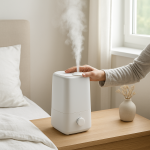
With the unit running, lightly press one area at a time: tank, top cover, side panels, grille. If the rattle stops when you press a specific area, that is the loose interface to correct.
Check for airflow restriction
Inspect the intake and outlet for dust buildup, pet hair, or objects too close to the vents. If your model has a wick or filter, verify it is installed correctly and not bowed or incorrectly seated.
Inspect the tank base and valve area
Make sure the tank cap is tight and the tank valve/seat area is clean so the tank sits evenly. Wipe away mineral crust that can prevent full seating.
Look for obvious fan interference without disassembly
Using a flashlight through the grille, look for a shifted duct, a loose label, or debris near the fan path. Do not insert tools or fingers into the grille.
Power reset if the noise began after a fault
Unplug for 2 minutes, then restart. This does not fix rattles, but it rules out a control-state change that altered fan speed behavior.
If the housing becomes unusually hot, the unit smells like overheating plastic, or it shuts off repeatedly, stop using it and move to professional service.
Normal Operating Sound vs Warning Signs
✔ Normal ultrasonic vibration: a soft, steady buzz or faint high-frequency hiss near the mist outlet, not a sharp rattle. Output remains stable.
✔ Normal fan airflow: smooth whoosh that scales evenly with speed, no clicking or tapping.
✔ Normal motor hum (fan motor): low steady hum that does not change when you touch the housing and does not include a rattle component.
✔ Normal water movement: occasional gentle gurgle as the tank equalizes, not continuous knocking.
Warning rattling: repeated tapping, clicking, or buzzing-rattle that stops when you press on a cover or tank, or that began right after moving/cleaning.
Warning grinding or scraping: harsh contact sound that follows fan speed, suggesting fan-to-shroud contact. Continued use can damage the fan.
Overheating smell or hot housing: stop use. Rattling is not the main concern at that point.
Motor stall signs: humming with little or no airflow, cycling on/off, or output dropping sharply. This can start as airflow restriction but may progress to motor stress.
When Professional Service Is Recommended
Rattle persists after reseating the tank, covers, and leveling and you can no longer change it with light hand pressure.
Scraping or grinding that tracks fan speed indicating likely fan contact or a worn fan motor bearing.
Repeated shutdowns, error lights, or overheating odor even after airflow is cleared.
Water leakage at the base that started alongside the noise, suggesting a seating/gasket or tank interface problem that needs correction.
No airflow with a hum present after confirming the intake is clear and filters are correctly installed.
How to Prevent This Problem
Seat the tank straight down and confirm it is fully flush before powering on.
Lock covers and filter doors fully by pressing along edges until tabs engage evenly.
Keep the unit level on a solid surface; avoid soft furniture, uneven shelves, or stacked mats.
Maintain good airflow clearance around intake and outlet so turbulence does not vibrate panels.
Clean mineral buildup at tank seating surfaces so the tank and base mate correctly.
Move and store carefully by removing the tank, emptying water, and carrying the base upright to avoid shifting internal ducts and covers.
Clean or replace wicks/filters on schedule so the fan does not overwork and excite housing vibration.
Related Air Treatment Noise Problems
Rattling only on high speed: loose grille or door fluttering from higher airflow.
Buzzing right after a filter or wick change: access panel not latched or wick frame installed crooked.
Rattling started after moving the humidifier: tank no longer seated flat or cover tabs shifted.
Clicking near the tank base: tank valve/float cover tapping due to mis-seat or low water weight.
Humming but no airflow: airflow restriction first, then possible fan contact or motor issue.
Sudden new rattle with normal output: a cover tab or fastener loosened and is now resonating.
Noise stops when you hold the top cover: top cover not fully locked or housing warped by uneven placement.
Rattle only when placed near a wall: normal vibration amplified by contact with wall or furniture.
Light rattling after cleaning: tank cap over-tightened or misaligned, preventing full tank seating.
Conclusion
A humidifier rattling noise is most often a loose tank, cover, or panel transferring normal fan or ultrasonic vibration into the housing, sometimes allowing light fan-to-shroud contact when a cover is misaligned. Next step: unplug, reseat the tank and all covers, verify level placement and clear airflow, then use a light-press test to pinpoint the vibrating part.
Frequently Asked Questions
Is a rattling humidifier dangerous to run?
Most rattles are loose covers or tank vibration and are not immediately dangerous, but scraping, grinding, overheating smell, or repeated shutdowns are stop-use conditions. If the rattle sounds like fan contact, discontinue use until the alignment issue is corrected.
How do I tell true electrical hum from vibration noise?
A true electrical source hum is usually steady and does not change when you press on the housing. Vibration-amplified motor noise and rattles typically change or stop when you apply light pressure to a cover, tank, or panel, or when you move the unit to a more solid, level surface.
Can I run it without the filter or wick to see if the noise stops?
For a short diagnostic check, some models allow a brief run to see whether airflow restriction is exciting a loose panel. Do not operate long-term without the correct filter/wick installed, and do not run in a way your manual prohibits.
Is this usually a repair or replace situation?
Loose tank seating, cover tab fitment, and panel vibration are typically quick corrections. Replace becomes more likely if there is persistent fan scraping, a worn fan motor bearing, or repeated shutdowns after airflow and seating checks.
What should I expect a service call to cost for a rattling noise?
If the issue is external fitment or a loose component, it is often resolved quickly during diagnosis. Costs rise if a fan motor, fan blade, or internal mounting is damaged and parts replacement is needed. If you can localize the rattle with the light-press test, that information speeds service and reduces labor time.
There’s a point where the argument stops circling and just… settles. Not because everything is magically fixed, but because the shape of the problem finally matches the shape of the solution.
That alignment feels almost anticlimactic, in the best way. You close the tab with a strange sense of relief, like you’ve been carrying a small bag of groceries and suddenly realized you can put it down.